
TikTok Shop
Use Order Automator to connect your Shopify store to your TikTok Shop account to:
- Automatically import TikTok Shop orders into Shopify
- Match TikTok products to Shopify products using SKU Mapping
- Customize the Shopify shipping method shown on imported orders
- Receive email notifications when orders require attention
- View recently imported TikTok Shop orders
- Optionally upload tracking to TikTok Shop within minutes of the order if fulfilling using Amazon MCF
How it works
Connect Order Automator to your TikTok Shop account, then enable the integration.
When enabled:
- New TikTok Shop orders are automatically imported into Shopify.
- Products are matched by SKU.
- If a TikTok SKU does not exactly match a Shopify SKU, you can create a SKU Mapping.
- Imported orders can trigger your existing Order Automator automations just like any other Shopify order.
Setup Steps
- Connect Order Automator to your TikTok Shop account.
- Enable the TikTok Shop integration.
- Configure your notification email.
- Configure your Shipping Map.
- Add SKU Mappings for products whose SKUs differ between TikTok Shop and Shopify.
Once enabled, new TikTok Shop orders will automatically begin importing into Shopify.
Already using Shopify's TikTok app?
Use one app to import TikTok Shop orders, not both. If Shopify's TikTok app and Order Automator both import orders, the same TikTok order is created twice in Shopify, and your fulfillment rules (ex: Amazon FBA) can process both copies.
Option 1: Keep Shopify's TikTok app
- Leave the Order Automator TikTok Shop integration disabled.
- Orders created by Shopify's TikTok app trigger your Order Automator rules like any other Shopify order. If you already have a fulfillment rule that sends website orders to Amazon FBA, it will send TikTok orders too when the rule's conditions match.
- To target only these orders, add the condition order channel → contains → TikTok.
Option 2: Switch to Order Automator's TikTok Shop integration
- Turn off order importing in the other TikTok app (or uninstall it) before you enable Order Automator's integration, so no order is imported by both.
- Order Automator imports new TikTok Shop orders from the time you enable it.
- To target orders Order Automator imports, use the condition order additional details → contains → TikTok order.
Not sure which option fits your setup? Contact us and we'll help.
Configuration
After connecting your TikTok Shop, you'll see the following options.
Enable
Enable or disable automatic TikTok Shop order imports.
When enabled:
- New TikTok Shop orders are imported into Shopify automatically.
- Imported orders are available immediately within Shopify and Order Automator.
Disabling the feature stops future imports but does not affect orders that have already been imported.
Notifications
Add a staff email address to receive important TikTok Shop notifications.
Examples include:
- Orders that require SKU mapping
- Orders that could not be imported
- Import errors
- Other important TikTok Shop integration events
We recommend using an email address that is monitored regularly.
Shipping Map
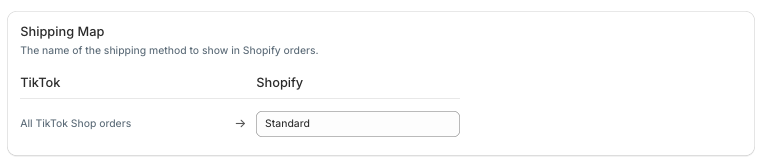
The Shipping Map controls which Shopify shipping method name appears on imported TikTok Shop orders.
For example:
| TikTok Shop | Shopify |
|---|---|
| All TikTok Shop Orders | Standard |
This setting only changes the shipping method name shown on the Shopify order.
The shipping amount imported from TikTok Shop is not affected.
SKU Map
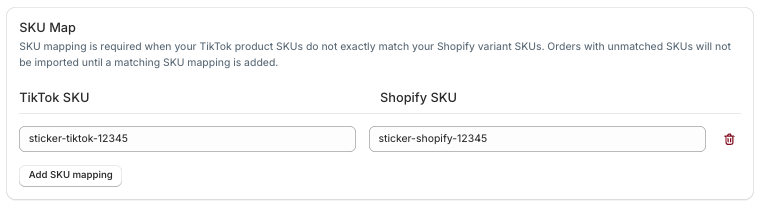
Products are matched using their SKU.
If the TikTok Shop SKU and Shopify SKU are identical, no configuration is necessary.
If they are different, create a SKU Mapping so Order Automator knows which Shopify product corresponds to the TikTok product.
Example:
| TikTok Shop SKU | Shopify SKU |
|---|---|
| sticker-tiktok-12345 | sticker-shopify-12345 |
Orders containing unmapped products will remain in a Needs Attention state until the missing SKU Mapping has been added.
Orders
The Orders tab displays recently imported TikTok Shop orders.
For each imported order you'll see:
- Shopify Order
- Import Status
- TikTok Order ID
- Shipping Paid
Clicking the Shopify Order number opens the order directly in Shopify.
Shipping Paid
The Shipping Paid column displays the shipping amount paid by the customer on TikTok Shop.
Possible values include:
- A dollar amount (for example $4.95) - TikTok reported the shipping amount.
- $0.00 - The customer received free shipping.
- — TikTok did not provide a shipping amount.
The Shipping Paid value is informational only and does not affect the Shipping Map configuration.
Additional Notes
Amazon early tracking for TikTok Shop orders
TikTok Shop requires tracking within a short window after an order is placed. When Amazon fulfills the order, a carrier tracking number usually isn't available until the package is picked up, which can be too late.
Amazon's early tracking number solves this. Amazon generates it within minutes of receiving the order, before a carrier is assigned, and the number stays valid for the life of the shipment.
Requirements
- The Amazon integration is connected and enabled for the United States marketplace
- Your products are assigned to the FBA United States | Order Automator location
- The order has a single item, quantity 1
How to enable it
- Go to Order Automations > Auto Fulfill and create or edit a fulfillment rule.
- Set the action to request fulfillment and choose the FBA United States | Order Automator FBA location.
- Under Amazon Options, check Fulfill with Amazon early tracking.
- Add a condition so the rule only applies to TikTok Shop orders:
- If Order Automator imports the orders: order additional details → contains →
TikTok order - If another TikTok Shop app creates the orders it might be something like this: order channel → contains →
TikTok
- If Order Automator imports the orders: order additional details → contains →
- Save the rule.
What the customer sees
- Order Automator sends the order to Amazon and Amazon returns the early tracking number within a few minutes.
- The order is marked fulfilled in Shopify with that tracking number, and no notification is sent to the buyer yet.
- Order Automator pushes the tracking number to TikTok Shop, meeting the upload deadline.
- When Amazon actually ships the package, the tracking number starts showing real carrier scans.
For orders imported from TikTok Shop, TikTok notifies the buyer about shipping. In regular workflos Shopify does not email them. This is intentional: TikTok provides a masked email address rather than the buyer's real one, so a Shopify notification would not reach them.
SKU Matching
Order Automator first attempts to match products using the SKU on the TikTok Shop order.
If no Shopify SKU matches exactly, Order Automator checks your configured SKU Mappings.
If no match can be found, the order will not import until a matching SKU Mapping has been added.
Existing Automations
Imported TikTok Shop orders behave like normal Shopify orders.
This means they can be used with:
- Order Automations
- Auto Tag rules
- Scheduled Automations
- Post Purchase Upsells
- Other Order Automator features
Disconnecting TikTok Shop
To disconnect your TikTok Shop:
- Go to Integrations > TikTok Shop.
- Click Disconnect TikTok Shop.
This will:
- Stop importing new TikTok Shop orders.
- Remove the connection between Order Automator and TikTok Shop.
Previously imported Shopify orders will not be removed.
Orders require SKU Mapping
If an order contains a product that cannot be matched to a Shopify SKU, Order Automator will pause the import until a matching SKU Mapping has been added.
Once the mapping has been created, future orders containing that SKU will import successfully.
Shipping Paid is blank
If Shipping Paid displays —, TikTok Shop did not provide a shipping amount for that order.
This is expected for some orders and does not prevent the order from importing.
Troubleshooting
If you're having problems with the TikTok Shop integration, see the Troubleshooting TikTok Shop article.
Need Help?
If you're experiencing issues with your TikTok Shop integration, contact us at support@orderautomator.com.