
Fulfillment Rules
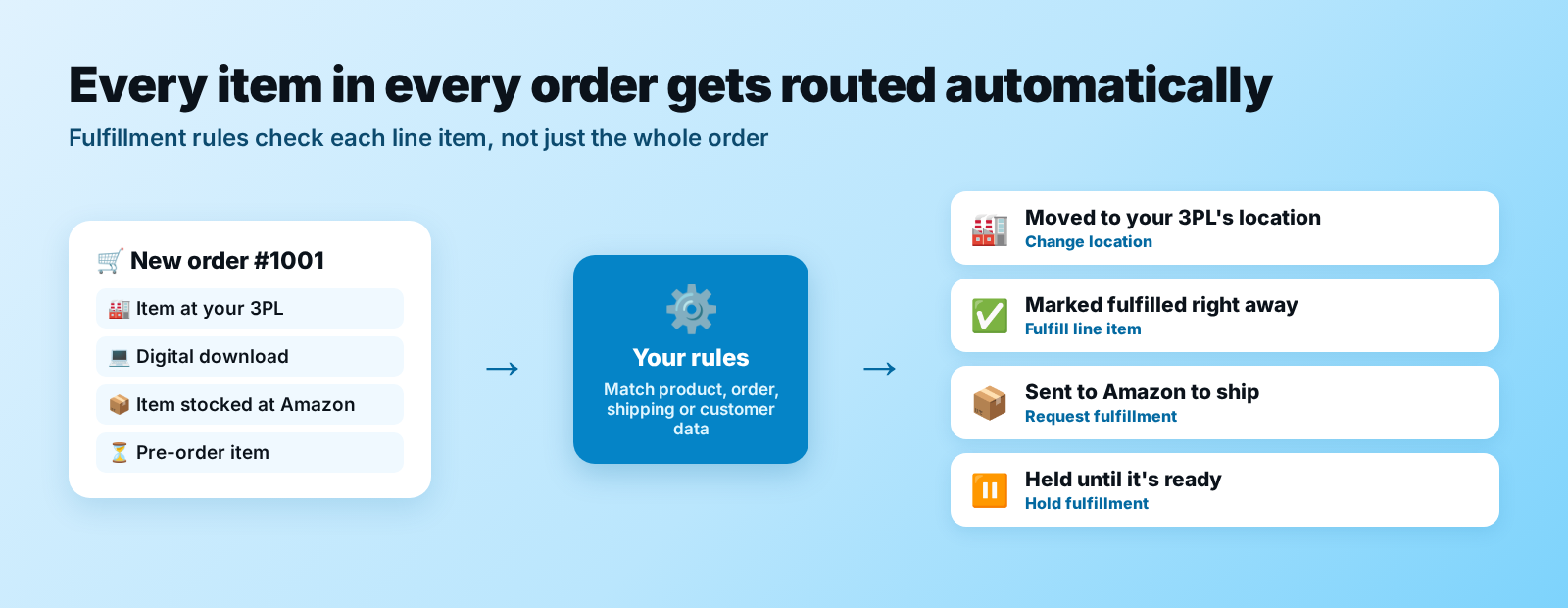
📦 Create rules to have Order Automator automatically make fulfillment actions on order line items. Set it up once, and every new order goes where it should: Your warehouse, 3PL, any location.
🚀 Amazon sellers: Hook up your account to automatically fulfill Shopify orders with your FBA inventory. Connect Amazon
⚙️ How it works
Go to Order Automations > Auto Fulfill in the app to create a rule.
You can create rules based on data points you see in the Shopify order, product, or customer page (shipping country, product tags, etc).
When Order Automator processes an order (by default on new orders), it compares your rules to each line item in the order.
- If the Shopify data matches the rule conditions then Order Automator makes a request to Shopify to trigger the action
- If you want to trigger the action on all line items if the order contains 1 matching item, contact us to customize
- If multiple fulfillment rules match the same item, then the rule that was created more recently takes priority
If a rule isn't working as you expect, see Troubleshooting Fulfillment Rules.
⚡ Available actions
- 📤 Request fulfillment
- Sends a fulfillment request to an app or 3rd party fulfillment service
- ✅ Fulfill line item
- Marks the line item fulfilled
- 🏭 Change location
- Changes the assigned fulfillment location of the line item(s)
- ⏸️ Hold fulfillment
- Places a hold on the items, preventing fulfillment
- ▶️ Release hold
- Releases a fulfillment hold
🎛️ Options
Wait for fulfillment holds to be released
- If the order is on hold at the time of processing, Order Automator waits and runs the rule after the hold is released. See Order Holds for more details.
- Use this if you use post purchase upsells (Shopify holds the order for up to 1 hour) so the rule sees the final items.
Hold notes
- When you make a fulfillment rule with the action to put the order on hold, you can set a reason that shows up in the order timeline.
🧩 Popular setups
A few rules our users set up all the time:
- 📦 Amazon-stocked items → Amazon: items assigned to your FBA location get Request fulfillment, so Amazon ships them (Connect Amazon)
- 🏭 3PL items → the right location: use Change location to move items to your 3PL or warehouse location (ex: by product tag or shipping country)
- 💻 Digital products → fulfilled right away: set the condition
product shippingisdigital productwith the action Fulfill line item - ⏳ Pre-orders → on hold: set the condition
product tagcontainspreorderwith the action Hold fulfillment, with hold notes so your team knows why - ✉️ Dropship suppliers → notified: use a Tag Order rule with a notification to email the supplier when their items are ordered
See all available conditions in Rule Selectors.
💡 More use cases
See ideas + common use cases here.
📖 Splitting orders between warehouses, 3PLs and Amazon? Read our guide: How to split Shopify orders across multiple warehouses.
📧 Fulfillment notifications to customers
Order Automator does not trigger fulfillment notifications to the customer when the above fulfillment actions are triggered.
If you'd like a notification sent to your supplier, vendor, fulfillment partner, etc, set up a Tag Order rule then attach a notification to it.
🧪 Testing fulfillment rules
You can test a rule by manually processing an existing order. See Testing Orders here for instructions.
🙋 Need help setting up a rule? Contact us and we'll help you build it.