
Thank You Page Messages
Create custom messages to show on your Thank You page after customers make a purchase.
📦 Plan: Thank You Page Messages are included on the Core plan ($10/mo) and higher, with a 14-day free trial. See Plans and pricing.
Example
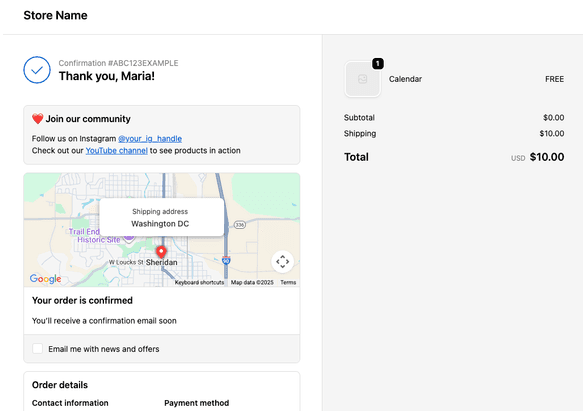
Ideas to get started
- Turn customers into followers by inviting them to join your main social media channel
- Offer a discount code to share with friends
- Add a positive message to solidify a great buyer experience
See more here: 10 Examples to get customer engagement
How it works
Go to the Thank You Page feature in the app. There you can create a new message and preview it, see your created messages, and check the analytics.
You can show the message on all orders, or selectively show it based on the order details.
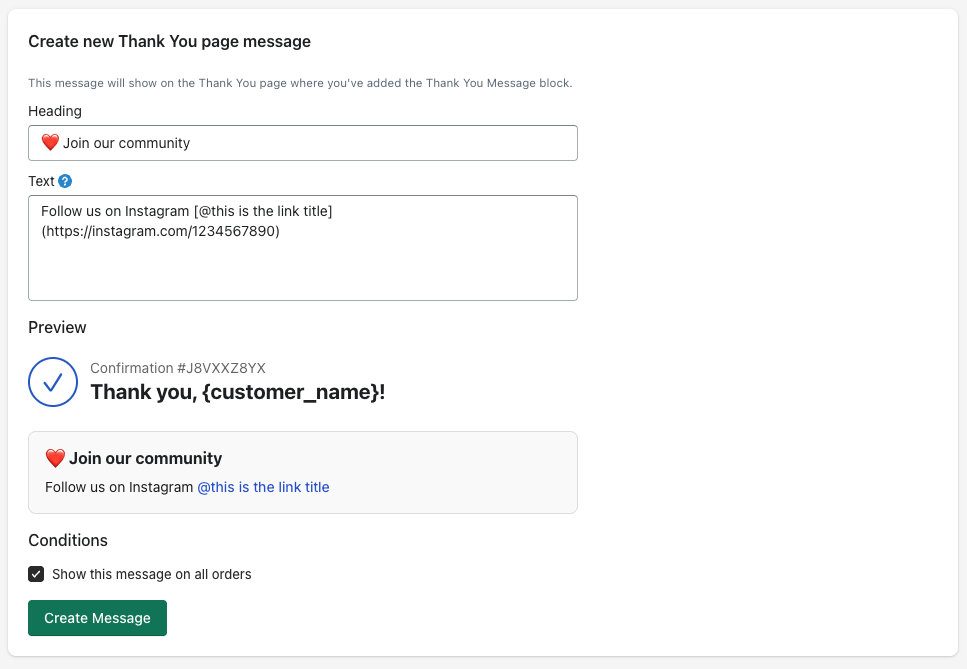
After you create a message, add the app block to your Theme customizer:
- Go to Online Store -> Themes in the Shopify admin
- Click Customize
- Click the page dropdown and navigate to Checkout, then Thank you
- Click the Apps icon in the sidebar
- Click the Thank You Message block to add it
- Click Save. Now that message will show to customers when they see the Thank You page
Customizing your message
Use text or emojis 🥳 to write your message and see the preview in realtime.
Use markdown syntax to spice up your message
- Create a link:
[Link text here](https://some-url.com) - To make text bold, wrap it in double asterisks:
**this text will be bold** - Insert an image:

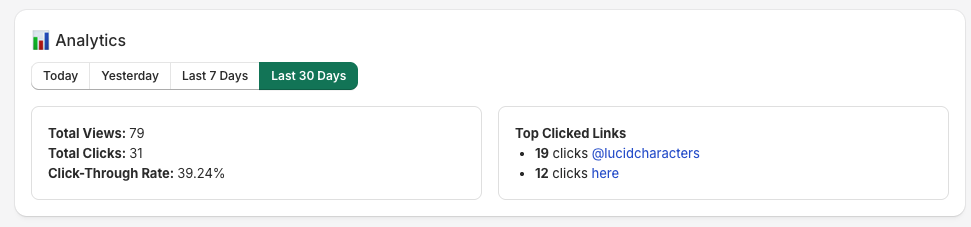
Analytics
Message views and clicks are tracked to help you see what's getting action.
More features
We're always adding more functionality to Order Automator. If you have any requests or ideas you want to share please let us know. We build for our community and strive to make the app an awesome tool for your store.